---
title: Redirect a HubSpot form to a thank you page based on a form field
description: How to update the URL that a form redirects to based on the answer the user selected on the form.
image: https://www.stephanieogaygarcia.com/hubfs/Website%20Imagery/Stephanie%20OGay%20Garcia%20-%20HubSpot%20CMS%20Designer%20and%20Developer%20L.png
---
[Skip to Content](https://www.stephanieogaygarcia.com/hubspot-website-development/redirect-a-hubspot-form-to-a-thank-you-page-based-on-a-form-field#main-content)
[](https://www.stephanieogaygarcia.com/)
Open Navigation
- [About](https://www.stephanieogaygarcia.com/about)
- [Services](https://www.stephanieogaygarcia.com/services)
- [Products](https://www.stephanieogaygarcia.com/shop)
- [Work](https://www.stephanieogaygarcia.com/portfolio-work)
- [Blog](https://www.stephanieogaygarcia.com/hubspot-website-development)
- [Contact](https://www.stephanieogaygarcia.com/contact)
- [About](https://www.stephanieogaygarcia.com/about)
- [Services](https://www.stephanieogaygarcia.com/services)
- [Products](https://www.stephanieogaygarcia.com/shop)
- [Work](https://www.stephanieogaygarcia.com/portfolio-work)
- [Blog](https://www.stephanieogaygarcia.com/hubspot-website-development)
- [Contact](https://www.stephanieogaygarcia.com/contact)
[HubSpot Sprocket Icon HubSpot Website Development ](https://www.stephanieogaygarcia.com/hubspot-website-development)
[forms](https://www.stephanieogaygarcia.com/hubspot-website-development/tag/forms)
# Redirect a HubSpot form to a thank you page based on a form field
Technical Difficulty: Advanced
Written by [ Stephanie O'Gay Garcia ](https://www.stephanieogaygarcia.com/hubspot-website-development/author/stephanie-ogay-garcia)
First Published: May 27, 2020
Last Updated: June 4, 2025
⚠️ Note that this post hasn't been updated for at least a year and the information may be outdated, proceed with caution! *(Last updated: June 4, 2025)*
Sometimes you may want to use a conditional redirect to send visitors to different thank you pages based on an answer they've selected on your form. For example, you might have a dropdown field asking them what location they are based in and you can redirect them to a specific Meetings link with a sales rep in their region.
As of June 2025, HubSpot has two types of forms:
1. [Legacy Forms](https://www.stephanieogaygarcia.com/hubspot-website-development/redirect-a-hubspot-form-to-a-thank-you-page-based-on-a-form-field#legacy-forms): require custom scripts for the conditional redirect
2. [New Form Editor](https://www.stephanieogaygarcia.com/hubspot-website-development/redirect-a-hubspot-form-to-a-thank-you-page-based-on-a-form-field#new-forms-editor): can be redirected directly in the form editor
Below you'll find instructions for each type.
### Sample Data: The Test Form Field
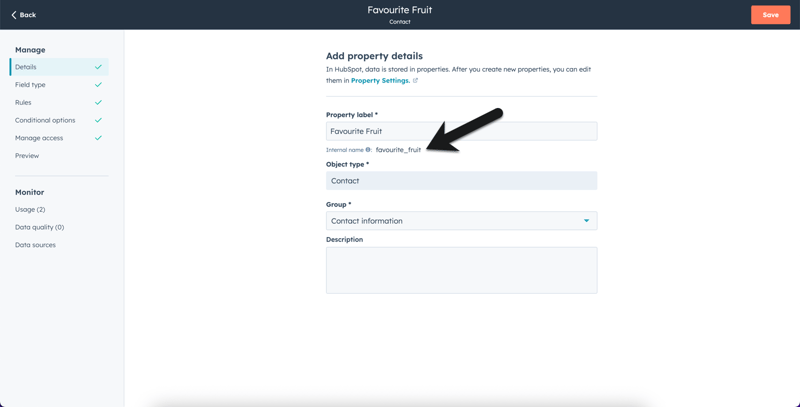
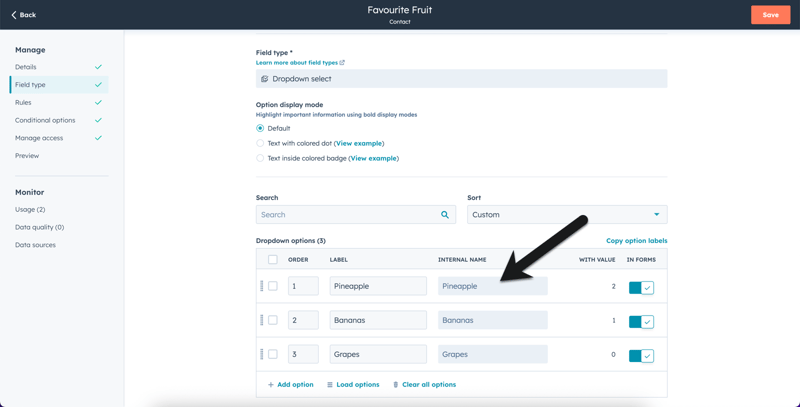
For testing purposes, I've [created a custom contact property](https://knowledge.hubspot.com/properties/create-and-edit-properties) called "Favourite Fruit" used in all of the examples below. It's a "Dropdown Select" type and has three options: Pineapple, Bananas and Grapes.
For the code snippets below, it's important to know the internal name for your property (favourite_fruit in this example):
And the internal name for each property option (Pineapple, Banana, Grapes in this example):
In our examples, when the form is submitted, the user will be redirected to the Wikipedia page for the fruit they've selected.
Note: be sure to set the form's redirect type to "inline message" as it will not work if it's been set to "redirect to a thank you page".
## 1. Legacy Forms
For legacy forms, you can use [HubSpot's onFormSubmit event](https://developers.hubspot.com/global-form-events) to detect when the form is submitted, find a particular field and update the URL based on the answer.
These will be different depending on whether your form is:
1. On a HubSpot website
2. An embedded form on a non-HubSpot website.
### 1a. Legacy Form on a HubSpot Website - Form Event Listener
The script to detect form submission event looks like this:
```
window.addEventListener('message', event => {
if(event.data.type === 'hsFormCallback' && event.data.eventName === 'onFormSubmit') {
for (item in event.data.data) {
if (event.data.data[item]["name"] == "favourite_fruit") {
if (event.data.data[item]["value"] == "Pineapple") {
window.location = "https://en.wikipedia.org/wiki/Pineapple";
}
if (event.data.data[item]["value"] == "Bananas") {
window.location = "https://en.wikipedia.org/wiki/Banana";
}
if (event.data.data[item]["value"] == "Grapes") {
window.location = "https://en.wikipedia.org/wiki/Grape";
}
}
}
}
});
```
The script detects the "onFormSubmit" event, loops through `event.data.data` to see what the user submitted on the form, using `event.data.data[item]["name"]` to get each form field's internal value and `event.data.data[item]["value"]` to see what the user entered in that form field.
In our example, we're using a condition to look for the field's internal name (favourite_fruit), and check which value (Pineapple, Bananas, Grapes) was selected.
[Live Demo](https://www.stephanieogaygarcia.com/demo/hubspot-form-with-redirects)
### 1b. Legacy Form embedded on a non-HubSpot website - Embedded Form Event
Because embedded forms are used within an iframe, the above code will not work. One option is to use set the "render as HTML" option in the style section of your form to prevent it from appearing in an iframe so that you can use the code above.
Alternatively, when you're embedding your for you can adjust the script to include the onFormSubmit logic:
```
```
Within this event you can use JavaScript or jQuery to find the field value, using a selector like var myField = `$form.find('input[name="FieldID"]').val();`
Note: the form submit event listener in the embed code above uses jQuery form object as the argument ( `onFormReady($form)` ) so you need to use jQuery on your website for this to work.
## 2. New Forms Editor
The new forms editor has it's own logic tools that you can use to redirect the form on submission.
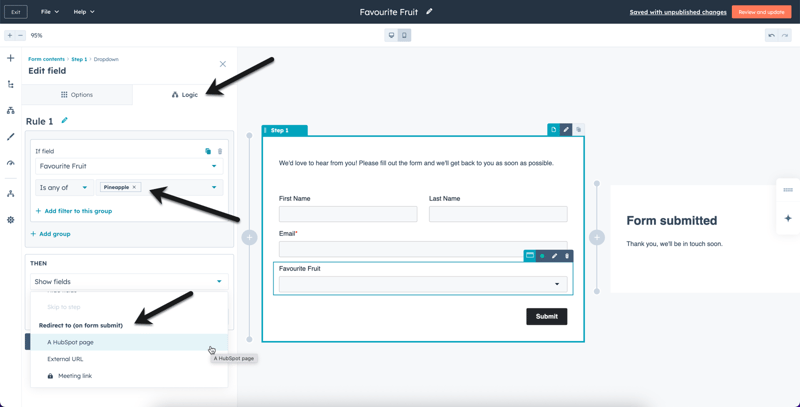
For example, when I add the "Favourite Fruit" field to the form, I can:
1. Click into the "Logic" tab
2. Select the condition (e.g. "If field Favourite Fruit is any of Pineapple")
3. Select the action (e.g. "Then redirect to (on form submit) a HubSpot page")
## Other Field Types
In our example we've used a dropdown select field, but you can adjust the logic above to check other field types.
### Number Field - Checks if number is within a certain range:
```
window.addEventListener('message', event => {
if(event.data.type === 'hsFormCallback' && event.data.eventName === 'onFormSubmit') {
for (item in event.data.data) {
if (event.data.data[item]["name"] == "number") {
if (event.data.data[item]["value"] <= 50) {
window.location = "https://en.wikipedia.org/wiki/Tomato";
}
if (event.data.data[item]["value"] >= 51 && event.data.data[item]["value"] <= 100) {
window.location = "https://en.wikipedia.org/wiki/Pepper";
}
if (event.data.data[item]["value"] >= 101 && event.data.data[item]["value"] <= 500) {
window.location = "https://en.wikipedia.org/wiki/Zuchinni";
}
if (event.data.data[item]["value"] >= 501) {
window.location = "https://en.wikipedia.org/wiki/Carrot";
}
}
}
}
});
```
[Live Demo](https://www.stephanieogaygarcia.com/hubspot-form-with-redirects-number-field)
If you found this helpful, buy me a coffee! ❤️
← Previous Article
[Comparison between HubSpot's CMS and the new CMS Hub / Themes](https://www.stephanieogaygarcia.com/hubspot-website-development/comparison-between-hubspots-cms-and-the-new-cms-hub-/-themes)
Next Article →
[Get HubSpot posts that contain all tags (Tag A AND Tag B AND Tag C)](https://www.stephanieogaygarcia.com/hubspot-website-development/get-hubspot-posts-that-contain-all-tags)
Contact
## Get help from a HubSpot CMS Expert
- Custom HubSpot themes and reusable and easy-to-use HubSpot templates and modules
- Technical support and guidance on the HubSpot CMS
[ Tell me about your project ](https://www.stephanieogaygarcia.com/project-details)
##### Contact
Need help with a HubSpot CMS project? Get in touch!
[Email](mailto:stephanie@stephanieogaygarcia.com) | [Contact](https://www.stephanieogaygarcia.com/contact)
##### About
- [ About ](https://www.stephanieogaygarcia.com/about)
- [ Portfolio ](https://www.stephanieogaygarcia.com/portfolio-work)
- [ LinkedIn ](https://www.linkedin.com/in/stephanieogaygarcia/)
- [ Facebook ](https://www.facebook.com/stephanieogaygarcia)
- [ Instagram ](https://www.instagram.com/stephanieogaygarcia/)
##### Services
- [ HubSpot Website Development ](https://www.stephanieogaygarcia.com/services/hubspot-website-development)
- [ HubSpot CMS Technical Support ](https://www.stephanieogaygarcia.com/services/hubspot-cms-technical-support)
- [ Custom HubSpot CMS Themes ](https://www.stephanieogaygarcia.com/custom-hubspot-cms-hub-themes)
- [ Pricing ](https://www.stephanieogaygarcia.com/services#pricing)
##### Latest Articles
- [How to add an llms.txt page to your HubSpot website](https://www.stephanieogaygarcia.com/hubspot-website-development/add-an-llmstxt-page-to-your-hubspot-website)
- [Switch an existing HubSpot custom module from global to local](https://www.stephanieogaygarcia.com/hubspot-website-development/switch-an-existing-hubspot-custom-module-from-global-to-local)
- [Overriding HubSpot's new forms styling from theme settings](https://www.stephanieogaygarcia.com/hubspot-website-development/overriding-hubspots-new-forms-styling-from-theme-settings)
- [All Articles](https://www.stephanieogaygarcia.com/hubspot-website-development)
---
Copyright © 2018 - 2026 Stephanie O'Gay Garcia. All Rights Reserved.
Freelance HubSpot CMS Developer based in Toronto, Canada 🇨🇦
[Terms of Service](https://www.stephanieogaygarcia.com/terms-of-service) | [Website Terms of Use](https://www.stephanieogaygarcia.com/website-terms-of-use) | [Privacy](https://www.stephanieogaygarcia.com/privacy-policy) | [Cookies](https://www.stephanieogaygarcia.com/cookie-policy) | [LLMs](https://www.stephanieogaygarcia.com/llms.txt)
Scroll to Top
```json
{
"@context" : "https://schema.org",
"@id" : "https://www.stephanieogaygarcia.com/#person",
"@type" : "Person",
"description" : "Freelance HubSpot CMS Developer specializing in custom HubSpot website development, themes, templates, and bespoke modules for small–mid sized B2B and SaaS companies.",
"image" : "https://www.stephanieogaygarcia.com/hubfs/Logos/stephanieogaygarcia_logo.svg",
"jobTitle" : "Freelance HubSpot CMS Developer",
"knowsAbout" : [ "HubSpot CMS", "HubSpot themes", "HubSpot templates", "HubSpot modules", "HubDB", "Website migrations to HubSpot CMS", "Figma to HubSpot implementation" ],
"name" : "Stephanie O'Gay Garcia",
"sameAs" : [ "https://www.linkedin.com/in/stephanieogaygarcia/", "https://www.facebook.com/stephanieogaygarcia", "https://www.instagram.com/stephanieogaygarcia/", "https://ecosystem.hubspot.com/marketplace/solutions/stephanie-ogay-garcia/" ],
"url" : "https://www.stephanieogaygarcia.com/",
"worksFor" : {
"@id" : "https://www.stephanieogaygarcia.com/#organization"
}
}
```
```json
{
"@context" : "https://schema.org",
"@id" : "https://www.stephanieogaygarcia.com/#organization",
"@type" : "Organization",
"address" : {
"@type" : "PostalAddress",
"addressCountry" : "IE",
"addressLocality" : "Dublin",
"postalCode" : "A94"
},
"contactPoint" : {
"@type" : "ContactPoint",
"areaServed" : "Worldwide",
"availableLanguage" : [ "en", "es" ],
"contactType" : "sales",
"email" : "stephanie@stephanieogaygarcia.com"
},
"description" : "Portfolio and business site of freelance HubSpot CMS Developer Stephanie O'Gay Garcia, based in Dublin, Ireland.",
"logo" : "https://www.stephanieogaygarcia.com/hubfs/Logos/stephanieogaygarcia_logo.svg",
"name" : "Stephanie O'Gay Garcia",
"sameAs" : [ "https://www.linkedin.com/in/stephanieogaygarcia/", "https://www.facebook.com/stephanieogaygarcia", "https://www.instagram.com/stephanieogaygarcia/", "https://ecosystem.hubspot.com/marketplace/solutions/stephanie-ogay-garcia/" ],
"url" : "https://www.stephanieogaygarcia.com/"
}
```
```json
{
"@context" : "https://schema.org",
"@id" : "https://www.stephanieogaygarcia.com/#website",
"@type" : "WebSite",
"name" : "Stephanie O’Gay Garcia – Freelance HubSpot CMS Developer",
"publisher" : {
"@id" : "https://www.stephanieogaygarcia.com/#organization"
},
"url" : "https://www.stephanieogaygarcia.com/"
}
```
```json
{
"@context" : "https://schema.org",
"@type" : "BlogPosting",
"author" : {
"@type" : "Person",
"name" : "Stephanie O'Gay Garcia",
"url" : "https://www.stephanieogaygarcia.com/hubspot-website-development/author/stephanie-ogay-garcia"
},
"dateModified" : "2025-06-04T10:47:40.072Z",
"datePublished" : "2020-05-27T14:04:50.000Z",
"headline" : "Redirect a HubSpot form to a thank you page based on a form field",
"mainEntityOfPage" : {
"@id" : "https://www.stephanieogaygarcia.com/hubspot-website-development/redirect-a-hubspot-form-to-a-thank-you-page-based-on-a-form-field",
"@type" : "WebPage"
},
"publisher" : {
"@type" : "Organization",
"logo" : {
"@type" : "ImageObject",
"url" : "https://www.stephanieogaygarcia.com/hubfs/Logos/stephanieogaygarcia_logo.svg"
}
}
}
```